Curve Crowd
Curve Crowd is geometry node based generator that distributes humaniq assets on curve. It is
spawned using engon Asset Browser, you can filter by Geometry Nodes filter.
Or you can use Blender's Native Asset Browser
Spawning
You can either click the button under the asset preview, or you can click the small arrow next
to the name and select Draw Geometry Nodes option. This will allow you to draw new Curve Crowd
directly on your scene meshes surfaces.
Curve Crowd Properties Panel
To modify Curve Crowd, head over polygoniq n-panel or go to the object modifiers
Make sure your Curve Crowd object is selected. Below is a quick explanation of each setting
available in the panel.
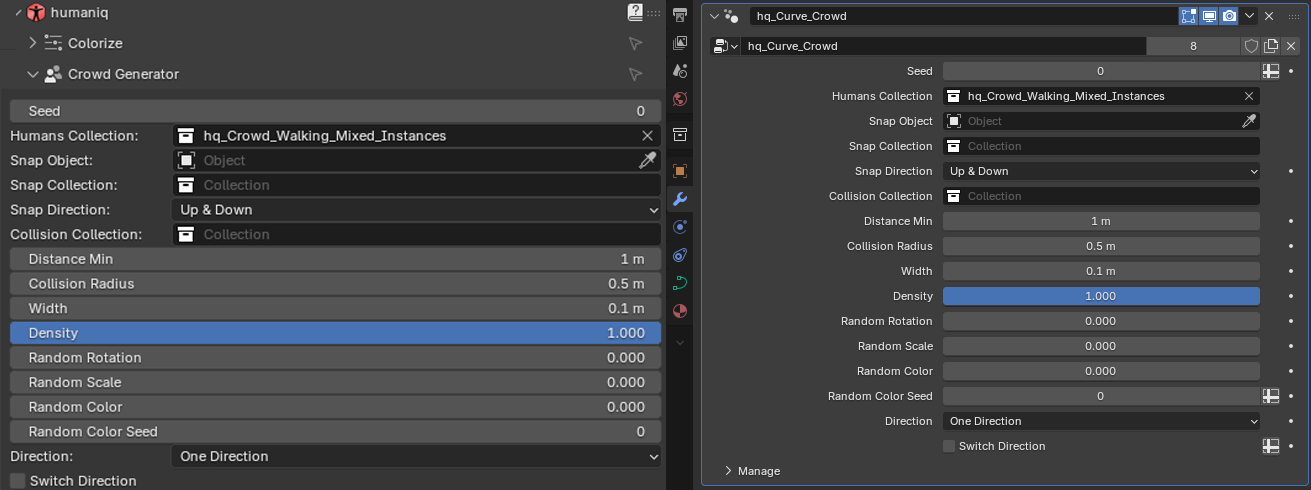
Settings
Seed
Different random variation of distribution, scale, rotation and color
Humans Collection
Blender collection of humaniq assets that will be used for scattering

Snap Object
Mesh object that can be used to snap assets to the ground.
Snap Collection
Same as snap object, but is a collection that supports multiple objects, we recommend using object if possible for performance reasons as all objects in collection need to be realized to calculate snap points.
Snap Direction
Switch which way should the assets snap.
Collision Collection
Collection of objects where spawning of assets will be disabled, useful for example for benches, lamp posts, etc...
Collision Radius
How far from the collision collection objects can people spawn
Width
How wide should the strip of people on the curve be, use very small number if you want for example line for shopping and bigger value if you want to cover entire street.
Distance Min
How close should the people be, smaller the number, more dense crowd. Beware that at very small distance there will be clipping happening between assets.
Density
Masking of assets, should be used for natural distribution of empty spaces in crowd.
Random Rotation
When 0 all assets face defined direction, when 1 all asset get random rotation between 0 and 360 degrees.
Random Scale
Make people scale more randomized, the scale is in range 0.9 to 1.1 to keep results realistic.
Random Color
All humaniq people assets have masks for upper and lower clothing, this slider will add random color and brightness to clothes.
Random Color Seed
Separate seed to cycle just random color.
Direction
- One Direction - all people face the direction of the curve tangent
- Two Directions (in lanes) - people the left of the curve face opposite direction than people on the right
- Two Directions (random) - people face randomly either direction of the curve or are rotated 180 degrees.
Switch Direction
Flip which direction people face by 180 degrees.