Editing Attributes
attribute editor lets you read and change Blender mesh attribute values directly on your selected vertices, edges, faces, or face corners.
The editor is accessible in two places within Edit Mode:
- The Sidebar Panel: Located in the 3D Viewport sidebar (
Itemorpolygoniqtab, press N to open). - The Popup Menu: Open it right at your cursor by pressing Ctrl+D.
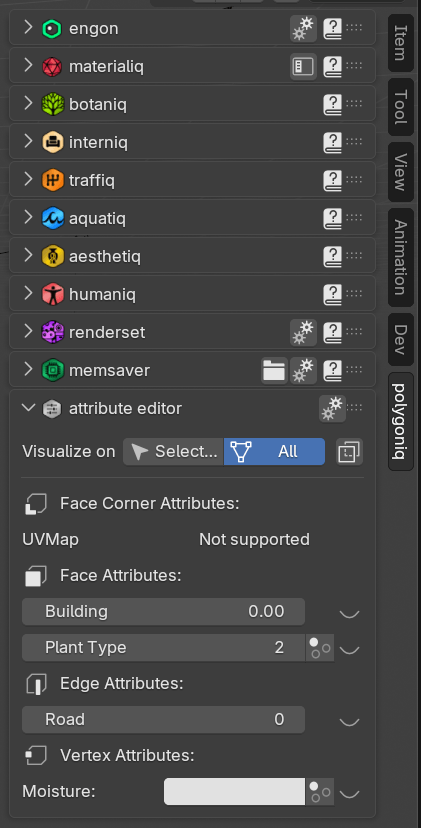
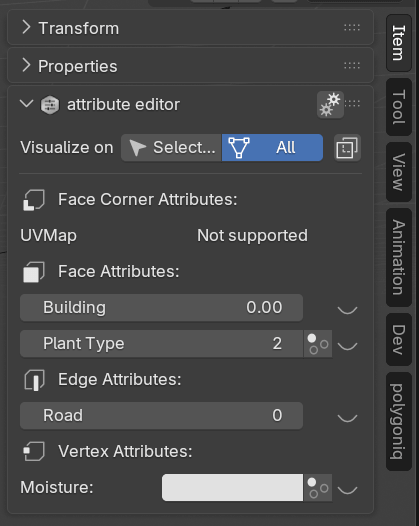
butes popup](../panel_overview_popup.png)
Info
The editor is only available in Edit Mode on a mesh object.
Editing Attribute Values
All attributes available for the currently selected mesh elements are displayed as editable properties.
- Displayed Value: The panel shows the attribute value of the active element. If no active element is present in the selection, it defaults to the element with the lowest index.
- Applying Changes: Modifying any property will apply the new value to all selected elements within that domain.
Attribute Grouping
Attributes are grouped by their domain (Vertex, Edge, Face, or Face Corner). If a domain has no selected elements or custom attributes, its heading is hidden.
Handling Mixed Selection
When your selected elements do not share the same value for an attribute, an Multi-value icon appears next to the field.
Clicking the icon copies the displayed value to all other selected elements in that domain.
The same functionality is also available by clicking the property with right mouse button and clicking Copy Attribute to Selected button.
Live Viewport Visualization
To the right of every attribute, click the Eye Icon to toggle its Attribute Visualization directly in the 3D Viewport.
Supported Attributes
attribute editor supports every attribute type commonly used to drive Geometry Nodes. The table below shows which of Blender's attribute data types can be edited directly in the panel:
| Data type | What it stores | Editable |
|---|---|---|
| Float | Single floating-point value, commonly used for weights or intensity values. | ✅ |
| Boolean | True or false value for binary conditions. | ✅ (Blender 4.4+) |
| Integer | 32-bit integer, used for indices or discrete values. | ✅ |
| Vector | 3D vector with floating-point values, often representing directions or positions. | ✅ |
| Color | RGBA color with 32-bit floating-point values, stored in linear Color Space. Suitable for high dynamic range and wide-gamut colors. | ✅ |
| Byte Color | RGBA color with 8-bit positive integer values, useful for compact color storage. These are always stored in the sRGB Color Space. For wide gamut or linear workflows, use the Color type instead. | ✅ |
| String | Text string for storing names or labels. | ✅ |
| 2D Vector | Two dimension vector with floating-point values, often used for UV coordinates. | ❌ |
| 4D Vector | Four dimension vector with floating-point values, often used for rotation quaternions. | ❌ |
| 8-Bit Integer | Small integer with a range from -128 to 127. | ❌ |
| 2D 16-Bit Integer Vector | Signed 16-bit 2D vector for compact storage of integer pairs. | ❌ |
| 2D Integer Vector | Signed 32-bit 2D vector. | ❌ |
| Quaternion | Floating-point Quaternion rotation used in 3D transformations. | ❌ |
| 4x4 Matrix | Floating-point matrix used for transformations or storing spatial relationships. | ❌ |
Hidden Built-in Attributes
Some default Blender attributes (like bevel_weight_edge or crease_edge) are hidden here because Blender already exposes them natively in the standard Transform panel.
Unsupported Attributes
The types marked ❌ above cannot be edited directly and will display Not supported. This is due to limitations in Blender's Python BMesh API, which prevents certain data types from being modified in Edit Mode. All types useful for Geometry Nodes are fully supported.