Frequently Asked Questions
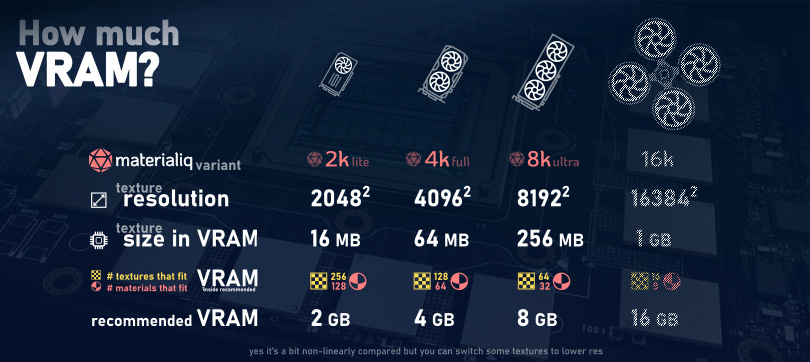
How much VRAM do I need?
These are the recommended VRAM sized for running materialiq
How do I update to a new version?
Updates of our asset packs are free, you only pay once. Updating procedure depends on which website you used to get the product.
Superhive
Lost receipt, lost order
In case you lost the Superhive receipt we cannot help you. Please contact Superhive support to retrieve your account or lost order.
- Navigate to Superhive and log in
- Go to Superhive Orders
- Click on 'Go to Downloads' next to
materialiq -
Download the latest version
-
Open
engonpreferences and update the asset pack
Gumroad
Lost receipt, lost order
In case you lost the Gumroad receipt or account we cannot help you. Please contact Gumroad support to retrieve your account or lost order.
- Navigate to Gumroad and log in
- Go to the Gumroad Library
- Click on
materialiq -
Download the latest version
-
Open
engonpreferences and update the asset pack
How do I upgrade to a higher variant (lite, full)?
Log in a Superhive account that owns materialiq. Add the desired
materialiq variant to your cart. The price difference between the two variants will be
deducted automatically.
Upgrading on Gumroad
Upgrading on Gumroad is not possible at the moment. Contact us on Discord server for a way to upgrade.
How do I report a bug? What about making feature requests?
Please refer to the Support page for more information about reporting bugs, making feature requests and getting support.
Could I use this asset pack on multiple computers?
If it is just you using materialiq, it does not matter how many computers you install the asset pack on.
However, if materialiq is used by multiple people, please purchase multiple licenses.
Any chance for a price drop soon?
We are running sales, giveaways, and other campaigns pretty often. Follow us on social media to be informed about the upcoming sales as soon as possible.
Is there a student discount available for materialiq?
Please send an email to our marketing department with some kind of student verification - student ID card, letter of acceptance, etc. You can also send us a contact (email address) to your school official.
I would like to get a refund, whom should I contact?
Before asking for a refund make sure to visit our Discord server, or leave us a message on either of the marketplaces and explain why you want to get a refund. In most cases we can help you with the problem you are having.
Getting the actual refund depends on the marketplace that you used for the purchase.
Superhive
Please contact Superhive support after reaching out to us. We are not able to do a refund on Superhive ourselves.
Gumroad
We are able to do refunds on Gumroad ourselves, so contacting us on our Discord server is enough.
Is my hardware enough to use materialiq?
Keep in mind that Blender is not a real-time application! If you find your viewport lagging remember that you can always hide assets (or entire collections) in viewport, display them as bounds, etc.
More tips and tricks can be found under Optimization.
Is it okay to include materialiq assets in .blends which I send to my clients?
Sorry, but that is a violation of the license - you unfortunately cannot use materialiq in this way. The license grants you rights to distribute any renders, animations or other products but not to redistribute the assets themselves.
In some cases it may make sense for the client to buy their own materialiq license. Then it is possible to send the assets as your client will have license rights for them.
Are there low poly versions of the assets?
Not at the moment, but what you can do is display particles as bounds to increase performance. You could also use the 'decimate' modifier on the assets.
How do I change the shaders?
Convert the assets to editable and then edit the shader using the Shader Editor.
Does materialiq work with Octane renderer?
materialiq does not support Octane by default at the current moment. Some of our users converted the materials for this use. You can contact them on our Discord server, or convert the materials.
Can I become your affiliate?
Possibly. Please email marketing@polygoniq.com with all the information you think is important. Do not forget links to your social media, their analytics, etc.
What is the difference between starter, lite, full and ultra variant of materialiq?
Every variant of materialiq contains all of the features!
Starter variant contains a few of assets for you to try materialiq and see if you like it. Lite, full and ultra contain all the assets, their only difference is the maximal resolution of the textures.
| Format | 1K | 2K | 4K | 8K |
|---|---|---|---|---|
| starter |  |
|
||
| lite | |
|
||
| full | |
|
|
|
| ultra | |
|
|
|
Can I use materialiq without engon?
Yes you can. You can extract the contents of the .paq file and register them as an asset library
in the Blender asset browser.
- Rename the
.paqfile to.zip, e. g. 'materialiq_full-5.2.0.paq' to 'materialiq_full-5.2.0.zip' - Extract the contents of the file to the location where you want your asset pack to live
- In Blender, open
Preferences -> File Paths - In the
Asset Librariessection add a new asset library via the plus sign button - In the file browser select the root folder of the extracted asset pack
- Save preferences
- You should see materialiq in the Blender asset browser
Video example
The texture files are missing, how do I fix that?
The easiest way is to change the image resolution in the addon GUI.
How to change texture resolution
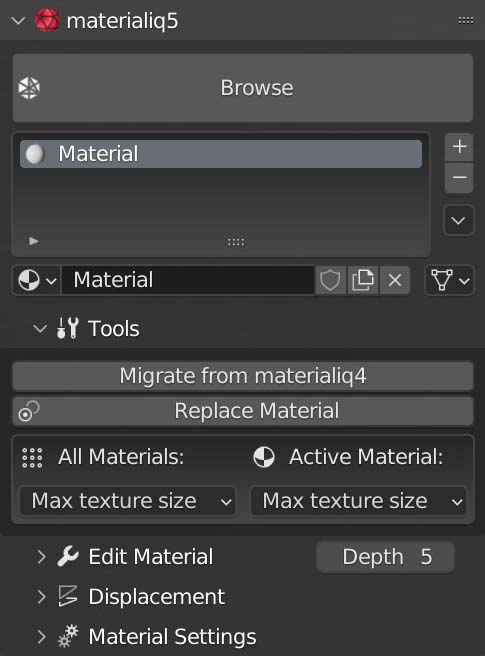 To change the texture resolution of
 materialiq materials head into the materialiq panel.
Choose if you want to change the resolution for all materials in the scene, or just for the
active material.