Branch and Leaves Masking
Some botaniq assets support masking of leaves and branches. You can filter those by using engon
tags has_branch_masking and has_leaves_masking. This feature allows for additional flexibility and
variability of how assets look. The pruning feature can also be used to fit the asset better for
example in narrow streets where the asset would clip into buildings etc...
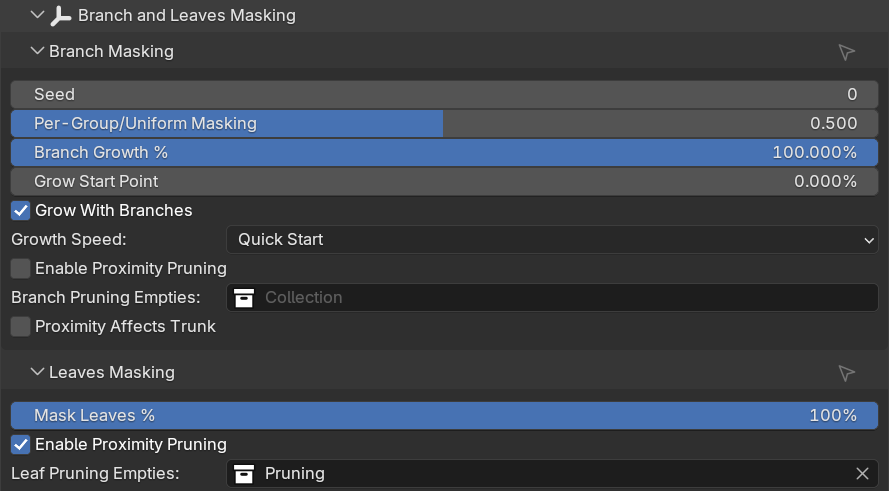
Branch Masking
Seed
Randomizes in which order the 4 branch groups are masked. For more information about the groups see below.
Per Group / Uniform Masking
Each botaniq asset with masking branches feature has its branch meshes divided into 4 vertex groups.
Uniform masks all branches at the same time, per group option will mask 4 group branches one by one.
Any value between 0.0-1.0 will blend between those two options.
Branch Growth %
How many % of branches are visible.
Grow Start Point
At what point of branch growth should the branches start to appear. This can be useful to offset the animation start if you also want to use grow with branches to simulate growing of the asset. In the example below masking is complete at 25% and nothing happens below this point.
Grow with Branches
Scale asset along with growing branches. This can somehow simulate growth of the asset.
Growth Speed
How is the grow animation interpolated. Left to right quick start, linear, quick end.
Enable Proximity Pruning
Use empties to mask parts of the asset.
Branch Pruning Empties
Collection of empties to use to mask the branches. Supports multiple empties.
Proximity Affects Trunk
Also remove trunk, not just branches.
Leaves Masking
Mask Leaves %
How many % of leaves are visible.
Enable Proximity Pruning
Use empties to mask leaves of the asset.
Leaf Pruning Empties
Collection of empties to use to mask the leaves. Supports multiple empties.